Automate Everything —
From Lead Capture To
Client Follow-Ups with our
CMART Workflows AI
Save Time, Stay Organised, and Convert More Leads
with our CMART AI-Powered Workflows
Manually following up, assigning tasks, and managing repetitive marketing actions?
That’s yesterday’s way of working.
With our CMART AI Workflows & Automation feature,
powered by built-in Marketing AI, you can automate everything —
from lead nurturing to task reminders — so nothing falls through the cracks.
Spend less time on admin and more time closing deals, growing your brand, or serving your clients.
What is the
CMART Workflows AI Feature?
Our CMART Workflows AI & Automation tool is a powerful drag-and-drop system
that lets you build intelligent, time-saving sequences across your entire client journey.
Whether you want to follow up with leads, onboard clients, assign internal tasks,
or send out review requests — it’s all automated, all in one place.
Combined with our CMART Marketing AI, this tool also helps generate messages,
suggest next steps, and intelligently route leads and tasks based on behavior
— giving your business an always-on assistant.
Key Features
Drag-and-Drop Automation Builder
Create custom workflows to automate emails, SMS, task assignments, and lead tagging — no coding required.

Built-In Marketing AI
Use AI to generate follow-up messages, prioritise leads, suggest actions, and even write campaign content automatically.

Automated Lead Follow-Up
Send instant responses to form submissions, missed calls, or booked appointments — so you never lose momentum.

Smart Task Assignments
Automatically assign tasks to team members based on client actions, pipeline stage, or tags — with reminders and deadlines.

Behaviour-Based Triggers
Set workflows to run based on actions like email opens, link clicks, page visits, purchases, or inactivity.

CRM & Funnel Integration
Every contact is synced across your CRM, funnel pages, email sequences, and calendars — ensuring a consistent journey

Event & Appointment Workflows
Send automated confirmations, reminders, follow-ups, and review requests — reducing no-shows and increasing client satisfaction.

Add
Unlimited Platforms
You can add additional platforms like YouTube, Pinterest, WhatsApp, Google etc. to extend your digital footprint.

Replace all other platforms and tools with
ONE software that does it all - our CMART-App
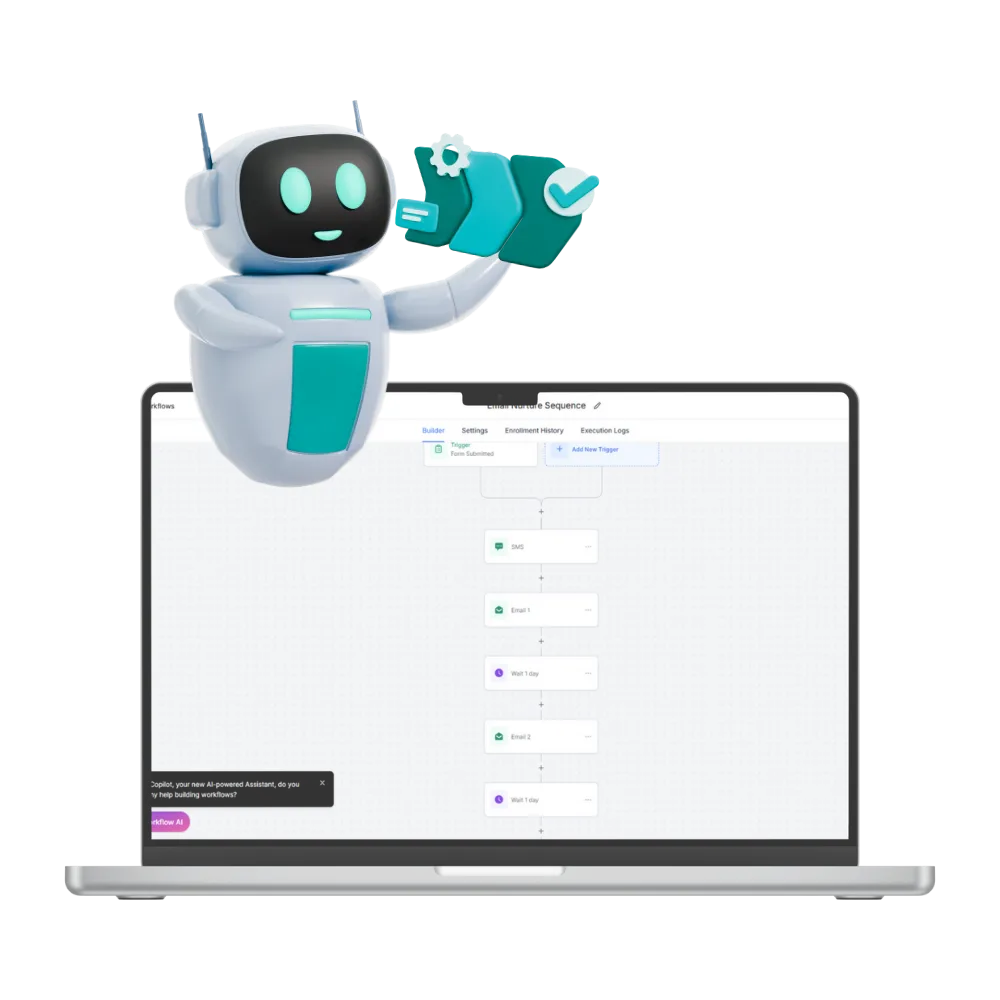
Workflows & Automation
Your business, on autopilot.
Send appointment reminders, get more Google reviews & more. automatically. Our workflow builder eliminates tedious manual tasks.
Take the heavy lifting off your shoulders.
Connects with the TOOLS you're already using









Who This is Perfect For
Coaches
Automating follow-ups and onboarding sequences
Consultants
Managing task flows and lead nurturing
Small Business Owners
Wanting to run smarter with fewer manual steps
Ready to grow your business?
Benefits Over Manual Work or
Basic Email Tools
Manual Processes or Email Tools
CMART Workflows AI
Missed follow-ups & inconsistent engagement
Manual task creation
Generic messaging
Disconnected systems
Repetitive admin work
Automated lead nurturing & timely communication
AI-driven task assignments & reminders
AI-written personalised emails & texts
Full CRM, calendar & funnel integration
Set it once, let automation do the rest
TESTIMONIALS
What Our Clients Are Saying

"Tripled conversations without a sales assistant"
“I now follow up with every lead — automatically. My conversions have tripled without hiring a sales assistant.”
Melissa J., Life Coach, Pretoria


"Open rates jumped to 40%"
“The AI even suggested a better message for my email sequence. I used it — and the open rate jumped by 40%”
Lukhanyo S., Health Consultant, Cape Town

"Highly recommend this"
"I did not realise what a gamechanger this tool could be, it literally changed the way I create my content..."
Lizzi, Graphic Designer, Cape Town
Work Smarter. Close Faster. Grow
Your business, on autopilot, Without the Grind.
Workflows & Automation puts your entire business on autopilot — while our CMART Marketing AI helps you personalise, prioritise, and perform better.
It’s like having a full-time team working 24/7 — without the overhead.
FAQ's
Q: Can I automate both client communications and internal tasks?
Conversations AI and Workflows AI to handle both sides:
Client Communications: Conversations AI manages your Facebook messages, Instagram DMs, SMS, WhatsApp, and emails from one integrated inbox — nurturing and replying to leads 24/7, even when you're away.
Internal Tasks: Workflows AI automates your backend operations — sending appointment reminders, requesting Google reviews, following up with forms, and triggering actions based on client behavior.
Think of it as having AI employees who handle the conversation AND the paperwork.
Q: How does Marketing AI help inside the workflow builder?
Marketing AI integrates directly into your workflows to automate your marketing touchpoints:
Smart Follow-ups: Workflows trigger personalized email/SMS sequences based on where leads are in your pipeline
Behavioral Triggers: Send targeted messages when someone opens an email, clicks a link, or abandons a booking
Content Creation: The Content AI feature generates scroll-stopping copy and visuals for your campaigns — directly usable within your workflows
Lead Nurturing: Automatically move leads through your funnel with timed, relevant communications without manual intervention
The workflow builder essentially becomes your 24/7 marketing department.
Q: Can I customise when and how workflows are triggered?
Yes, full customization.
You control the triggers and logic:
Custom Triggers: Set workflows to fire on specific actions — form submissions, booking confirmations, payment received, tag applied, stage changed in your pipeline
Timing Control: Delay actions by minutes, hours, or days; schedule sequences; set business hours-only execution
Conditional Logic: Branch workflows based on lead behavior, custom fields, or tags — different paths for different scenarios
Multi-channel Actions: Trigger emails, SMS, internal notifications, task assignments, or webhook calls to other tools
The workflow builder gives you point-and-click customization without needing to code.
Will this replace my email marketing or task management tools?
Yes — that's exactly what it's designed for.
The benefit: Instead of paying for 5+ subscriptions and duct-taping them together, you run everything from one dashboard with data that actually talks to each other.
Your email list knows when someone booked a call. Your CRM knows when an invoice was paid. Your workflows know to stop sending marketing emails to someone who just became a client.
That said: If you love a specific tool and it works, CMART integrates with leading software via unlimited business integrations.
You're not forced to migrate everything on day one. Many clients start with one feature (like replacing their booking tool) and gradually consolidate as they see the value.
Tool Category
CRM
Email Marketing
Booking System
Invoicing
Form Builder
Website / Funnel Builder
Course Platform
Review Management
Social Media Scheduler
Accounting Software
Payment Gateway
What it Does
Track leads, manage pipeline
Send campaigns, automation
Calendar scheduling
Send invoices, get paid
Lead capture forms
Landing pages, funnels
Online courses, memberships
Google review management
Post to social platforms
Financial tracking, tax
Process payments
Can CMART do it?
Yes
Yes
Yes
Yes
Yes
Yes
Yes
Yes
Yes - Content AI
Yes - Integrates
Yes - Integrates
+ much more
FOLLOW US


TAKE ACTION
COMPANY
LEGAL
CUSTOMER CARE
Copyright 2026. CREATIVE MEDIA AGENCY. All Rights Reserved.